

AVAYA DOCUMENTATION CENTER
Find answers to your technical questions and learn how to use our products
Avaya Device Adapter Snap-in Reference
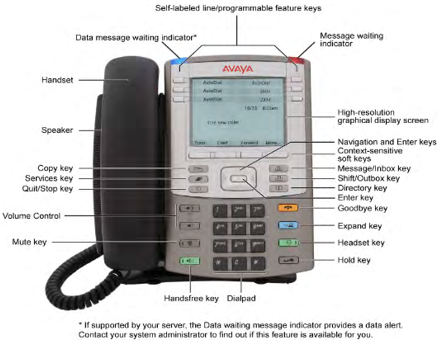
UNIStim 1140 phone
Note:
The 2050 soft client looks and acts effectively the same as the 1140 UNIStim phone. However, as a soft client it has an interconnection to the PC to consider. For example, unless the application is opened, it cannot process calls.
The 1140 phone has six programmable feature buttons with Shift, allowing twelve to be programmed, similar to the IP 2004 phone.
The following are the common features between 1140 and 2004 phones:
-
Twelve programmable feature keys: Six physical lines or feature keys, and six lines or features accessed by pressing the Shift key.
-
Because it has effectively twelve programmable keys, it is capable of multiple lines up to twelve.
-
-
The station also allows the user to customize feature key labels, with limitations.
-
Four context-sensitive soft keys that provide access to a maximum of 10 features
-
Large LCD Display (7x24 character)
-
The top three lines provide labels for the programmable buttons.
-
The next three lines show either idle display or call information.
-
The bottom line shows the current feature name for the soft key under the label.
-
-
Handsfree
-
Speakerphone
-
Headset port and headset key
-
-
Volume keys rather than volume bar. The volume keys perform the same function as the volume bar.
-
Hold, Release, Handsfree (Speaker), Headset, Mute, and Expand to PC keys.
-
Six specialized fixed keys:
-
Quit
-
Directory (Personal Directory)
-
Message (Inbox)
-
Shift or Outbox
-
Services
-
Copy. This not present on the 2004 phone.
-
-
Message Waiting Lamp and visual ring indicator.
In addition to the preceding features, the 1140 phone has the following capabilities:
-
Integrated Gigabit Ethernet Switch. Only one network port is required for phone and PC.
-
USB port for accessories such as wireless headset, mouse, or keyboard.
-
Wide-band audio if a third-party headset or handset that supports wide-band is connected.
-
Most fixed keys with an LED indicator integrate that into the button, rather than having it elsewhere on the station.
-
An Enter key at the center of the navigation rocker.
-
The feature status lamp. This has a narrow range of services for which it can be used and active.
The 1140 supports attaching one or more expansion modules to add the following:
-
18 additional buttons (one module without Shift).
-
36 additional buttons (one module with Shift or two modules without Shift).
-
54 additional buttons (three modules without Shift).