AVAYA DOCUMENTATION CENTER
Find answers to your technical questions and learn how to use our products
Avaya Aura® Communication Manager Feature Description and Implementation
User profiles for Communication Manager server Web page access
On the Communication Manager Web server interface, the Web Access Mask page specifies which Communication Manager server Web pages a user may access. The Web profile is sometimes called the Web Access Mask. The Web profile defines the type of access to each Web page. You can view only those Web pages permitted by the Web profile when you access the Web interface.
The Web Access Mask Web page specifies read or read/write access for every Web page.
Using Communication Manager Web pages, you can access those functions that are normally restricted to the root login. Logins that are members of the susers Linux group may have full access to the Web pages. Logins that are members of the users Linux group may have only limited access to the Web pages.
The Web profile has an identification number between 0 to 69. This number corresponds to a Linux group.
The Web profile numbers, 0 to 19, correspond to the fixed profiles, 0 to 19, in Communication Manager. Profile numbers 0 to 3, 18, and 19 are built into Communication Manager and cannot be edited.
Profile numbers 0 to 3 and 18 have access to all Web pages, as members of the Linux group susers.
Profile number 19 has access to a subset of Web pages as a member of the users Linux group.
Profile numbers 4 to 17 are reserved for future use.
Profile numbers 20 to 69 are available for customer use for customized profiles.
Logins that are members of the susers Linux group and a member of the profile group prof18, corresponding to profile 18, have access to all the possible Web pages.
Logins that are members of the users Linux group and a member of the profile group prof19, corresponding to profile 19, are redirected to a subset of the Web pages.
When adding a user profile, Avaya recommends copying profile 18 for susers (customer super-user access) or profile 19 for users (customer non-super-user access) depending on the basic Communication Manager web access required, and reducing the permissions as required.
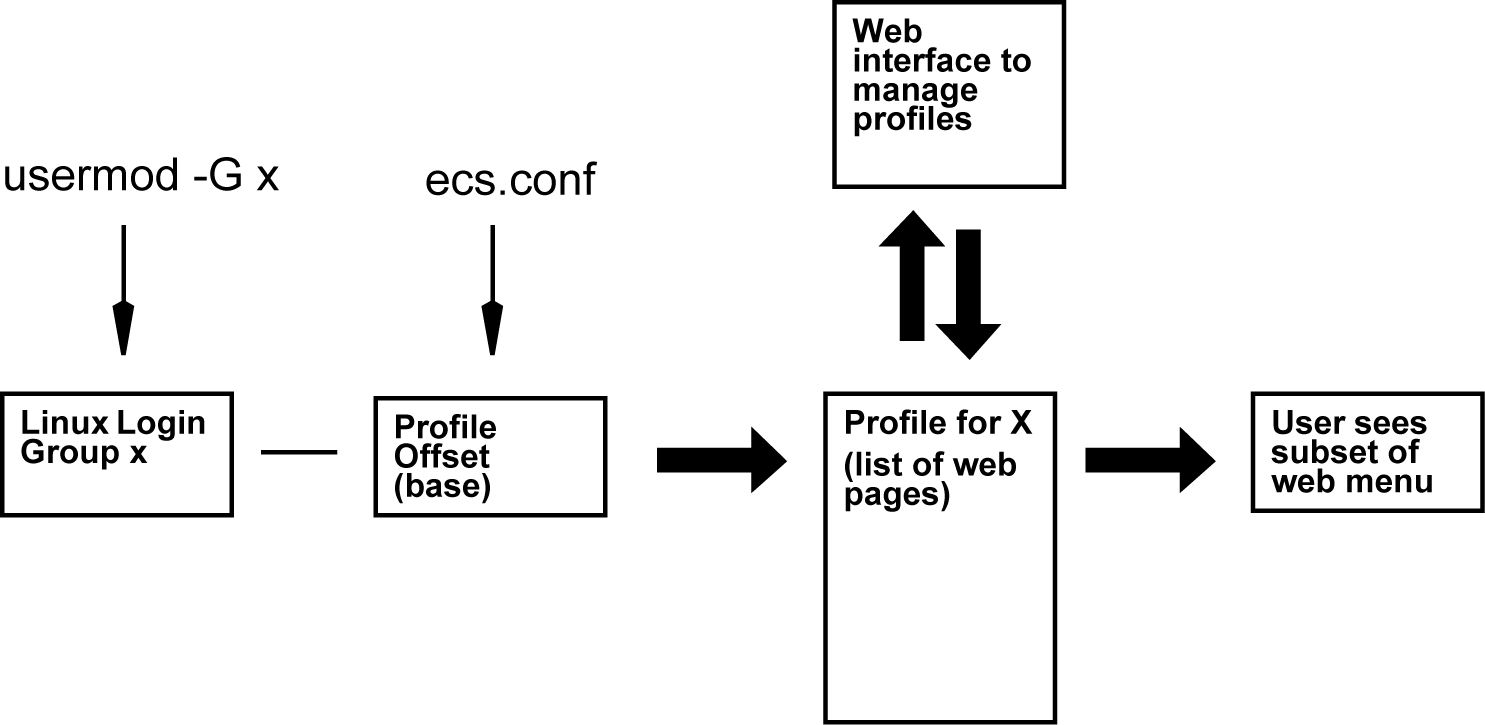
The figure shows the process used to manage Communication Manager web profiles. The user’s profile is identified by subtracting the Profile offset base (Communication Manager_PROFILE_BASE) from the user’s Linux group number.