

AVAYA DOCUMENTATION CENTER
Find answers to your technical questions and learn how to use our products
Avaya Aura® Communication Manager Feature Description and Implementation
Avaya Video Conferencing Solution
Avaya Video Telephony Solution provides videoconferencing abilities for your desktop and group video communications. Avaya Video Conferencing Solution can be administered in the following ways:
Avaya Aura® Conferencing without external gatekeepers or MCUs
This configuration does not involve external MCUs or external gatekeepers. All endpoints are H.323-based and registered to Communication Manager or SIP-based and registered to Session Manager. Scopia XT5000 includes an optional embedded MCU.
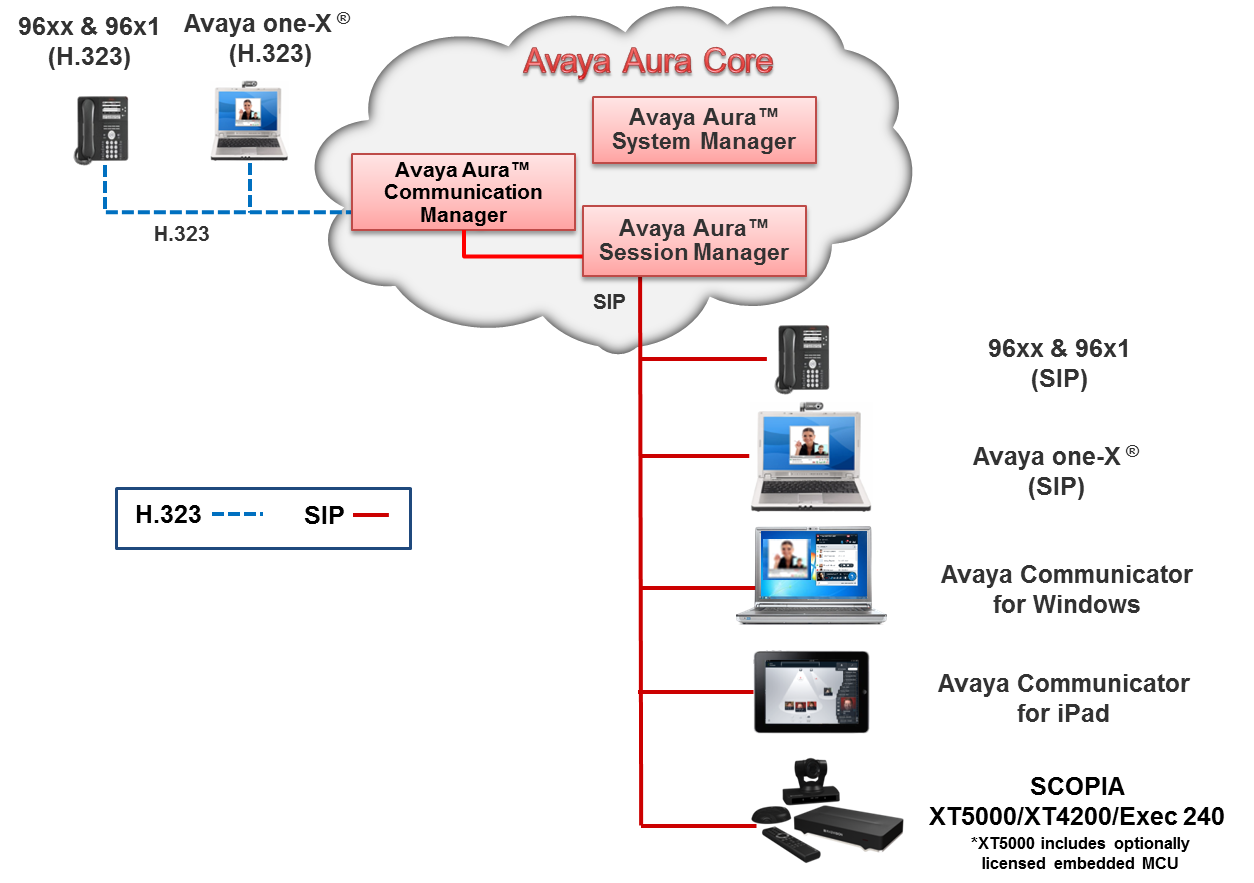
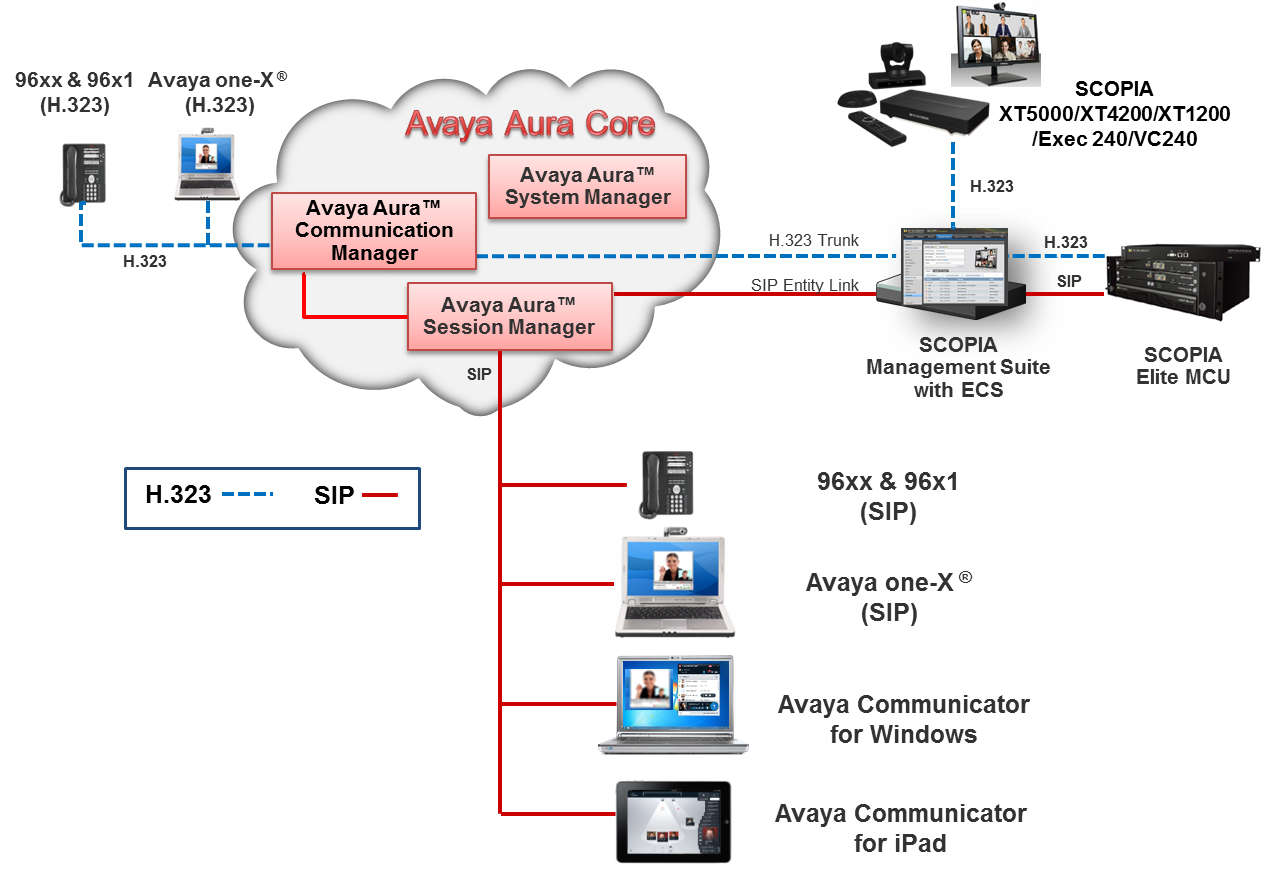
Avaya Aura® and Scopia interoperability
An H.323 trunk between Communication Manager and Scopia ECS Gatekeeper. Point-to-point calls between H.323-based and SIP-based Avaya video endpoints and H.323-based Scopia endpoints connect through the H.323 trunk. Conference calls that are hosted on the Scopia Elite MCU and involve H.323-based Avaya video endpoints connect through the H.323 trunk.
A SIP trunk between Session Manager and the B2BUA component of Scopia iView Management Suite Release 7.7 or Scopia Management Release 8.3.
Conference calls that are hosted on Scopia Elite MCU and involve SIP-based Avaya video endpoints connect through the SIP trunk.
Note:
Avaya audio endpoints can connect to Scopia Elite MCU through the H.323 trunk or through the SIP trunk.
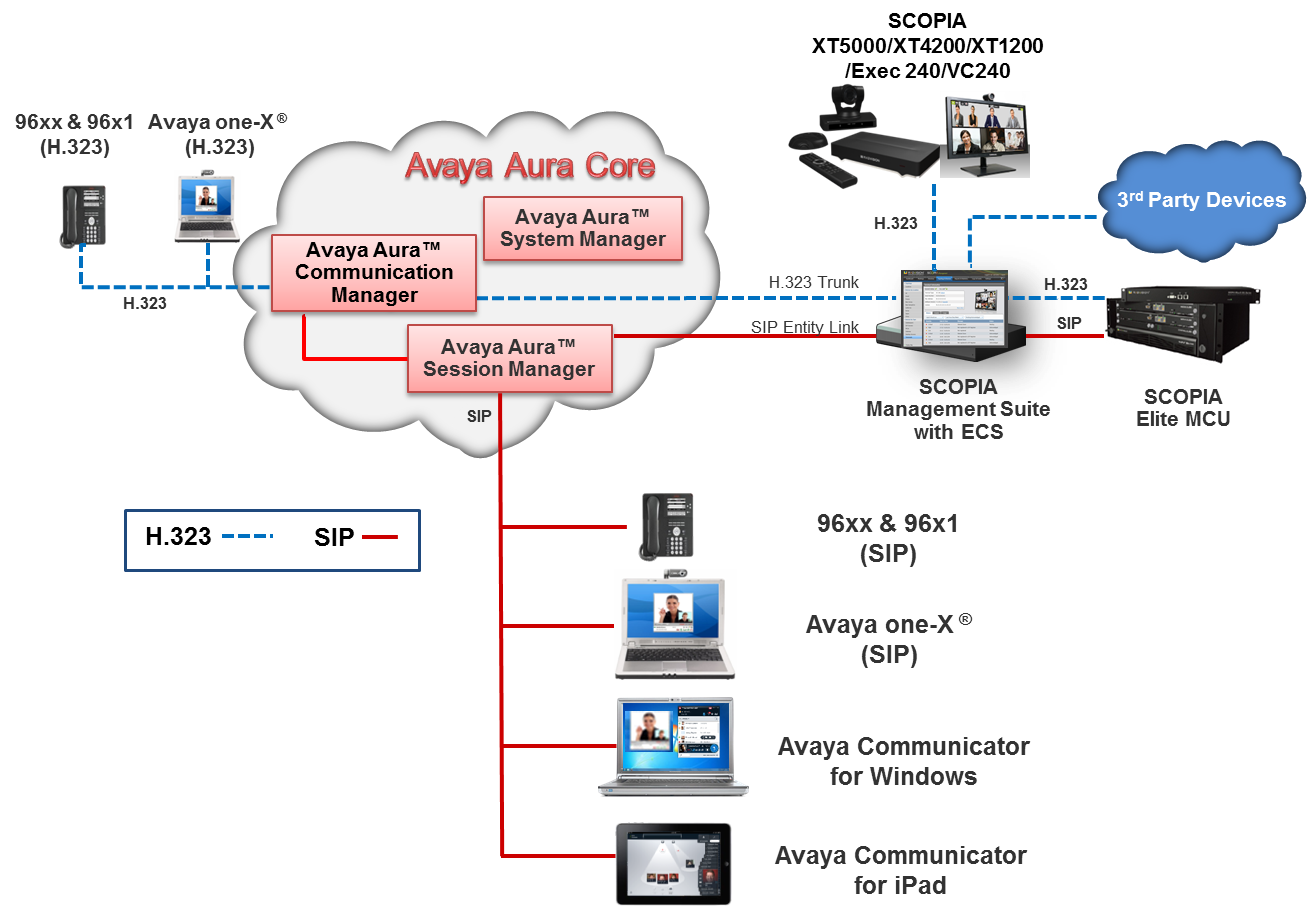
Avaya Aura® and Scopia interoperability with third-party endpoints
This configuration involves third-party endpoints that register to Scopia ECS Gatekeeper in the interoperability between Avaya Aura® and Scopia.
Note:
Point-to-point video calls between Avaya Aura® video endpoints and third-party endpoints connected to Scopia Management are not supported. These calls must connected through the Elite MCU.
Avaya Aura® with the external Polycom MCU and H.323-based endpoints
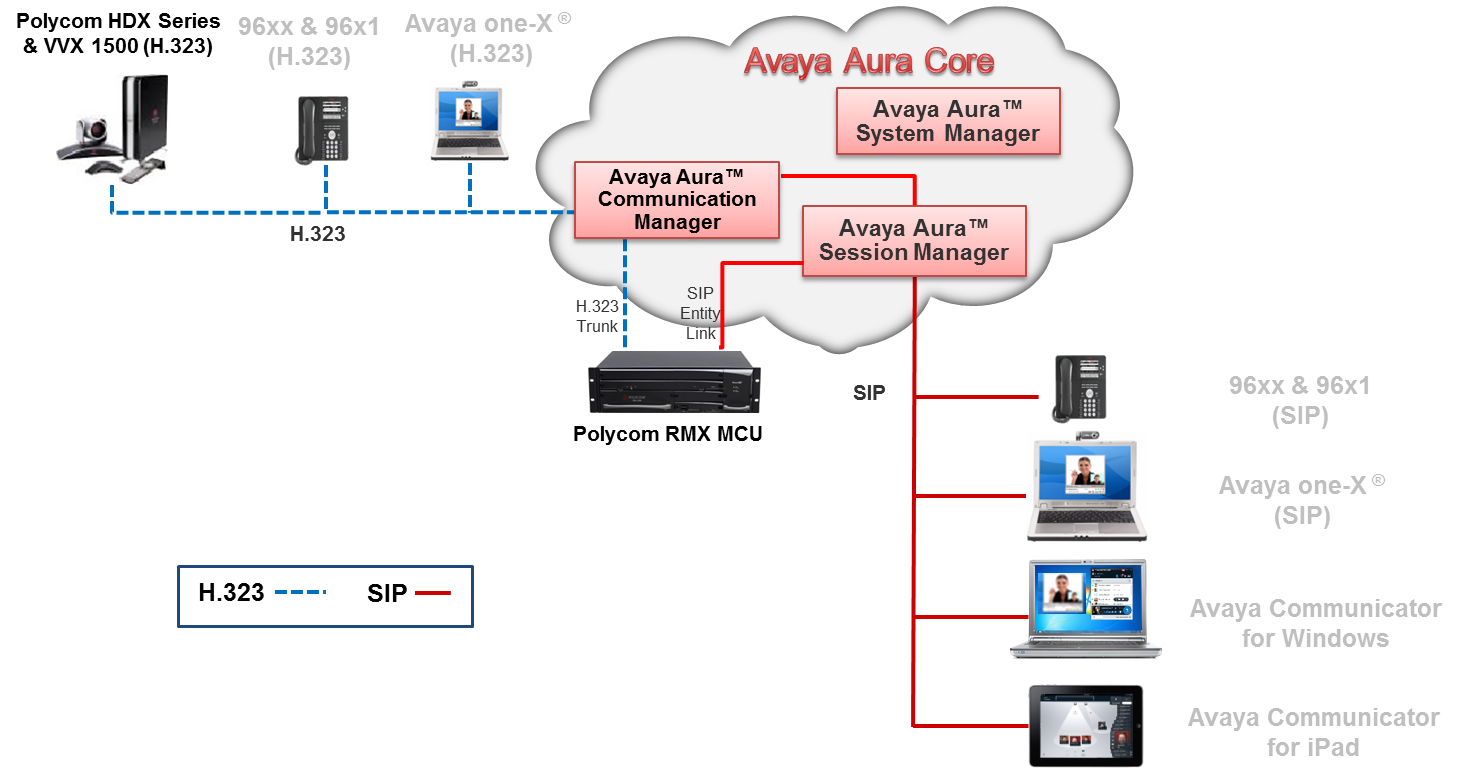
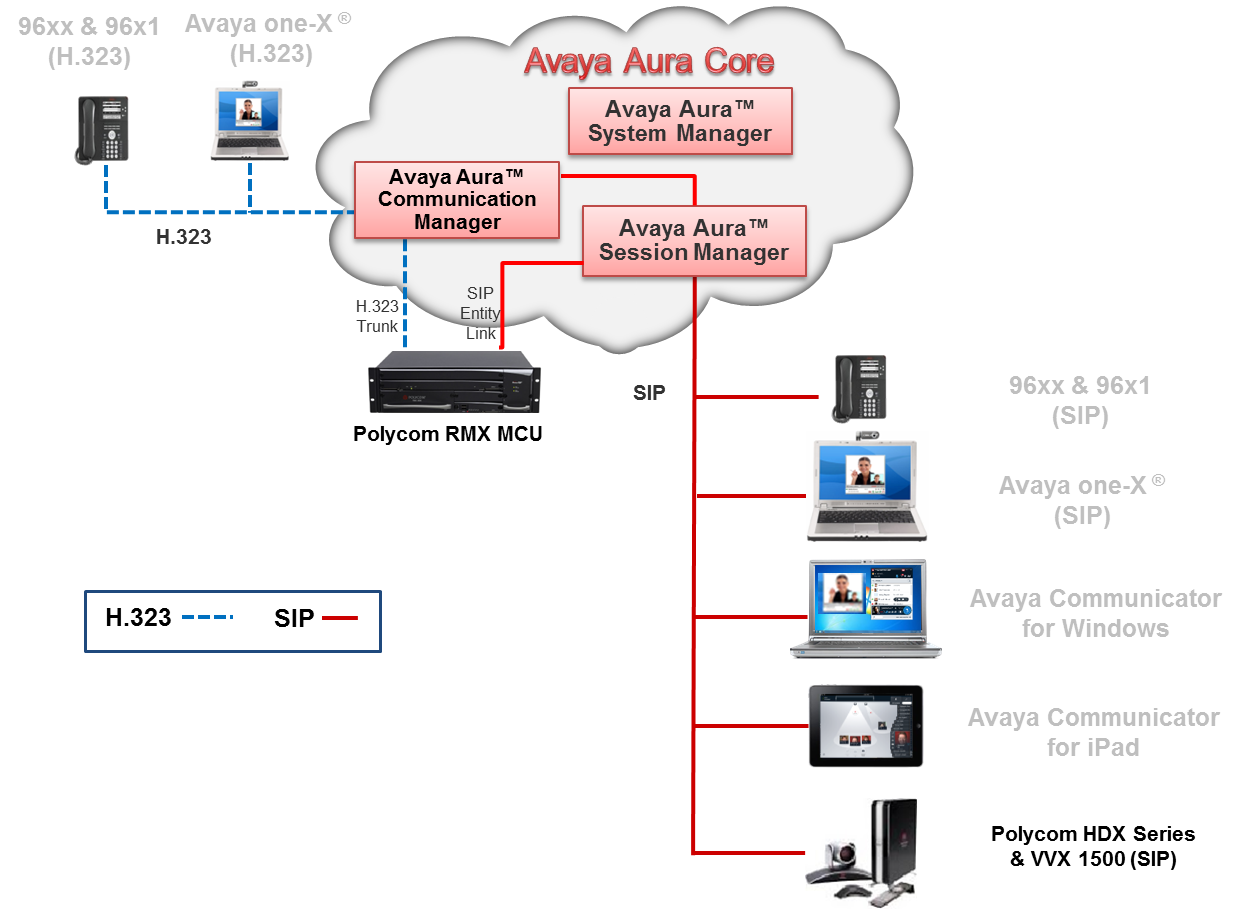
In this configuration, Polycom is integrated directly into Avaya Video Conferencing Solution. Polycom HDX series endpoints are registered directly to Communication Manager. The Polycom RMX MCU is administered for dual connectivity as:
An H.323 trunk to Communication Manager
A SIP trunk to Session Manager
An H.323 trunk to Communication Manager. A SIP trunk to Session Manager.
Call routing is administered to ensure that call routes are established between these two trunks based on the protocol of the endpoint. For example, a SIP-based call route is established through the SIP trunk between Polycom RMX and Session Manager, while an H.323-based call route is established through the H.323 trunk between Polycom RMX and Communication Manager.
Avaya Aura® with the external Polycom MCU and SIP-based endpoints
This configuration involves the external Polycom MCU and SIP-based endpoints in the direct integration of Polycom with Avaya Video Conferencing Solution. Polycom HDX series and Polycom VVX 1500 endpoints are SIP-based in this interoperability solution.
Avaya Aura® and Polycom interoperability
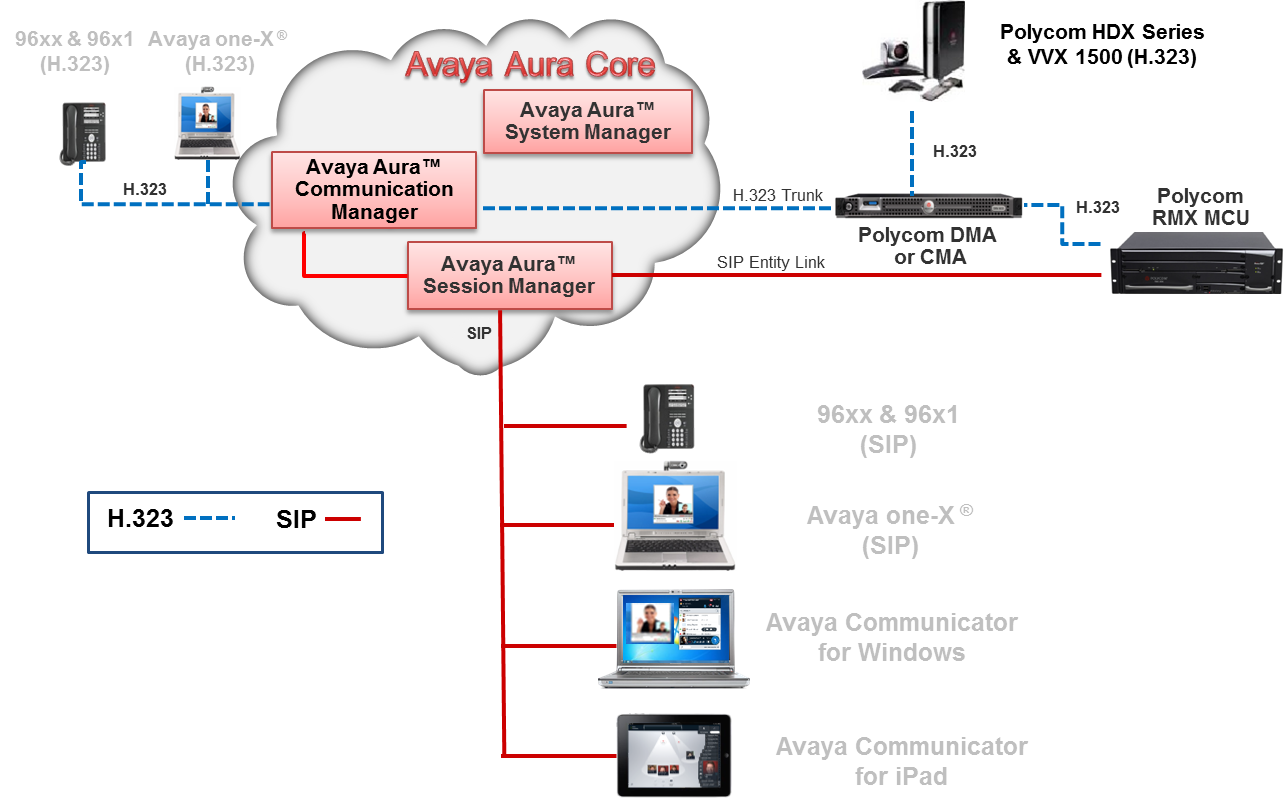
Avaya Aura® is integrated with and Polycom through:
Polycom RMX MCU administered for dual connectivity: An H.323 trunk to Communication Manager and a SIP trunk to Session Manager.
Polycom DMA Gatekeeper or Polycom CMA Gatekeeper: An H.323 trunk to Communication Manager. Point-to-point calls between H.323-based and SIP-based Avaya video endpoints and H.323-based
Point-to-point calls between H.323-based and SIP-based Avaya video endpoints and H.323-based Polycom endpoints connect through the H.323 trunk. Conference calls that are hosted on the Polycom RMX MCU and involve H.323-based Avaya video endpoints connect through the H.323 trunk.
Call routing is administered to ensure that call routes are established between these two trunks based on the protocol of the endpoint. For example, a SIP-based call route is established through the SIP trunk between Polycom RMX and Session Manager, while an H.323-based call route is established through the H.323 trunk between Polycom RMX and Communication Manager.
For more information, see Administering Avaya Video Conferencing Solution Quick Setup.