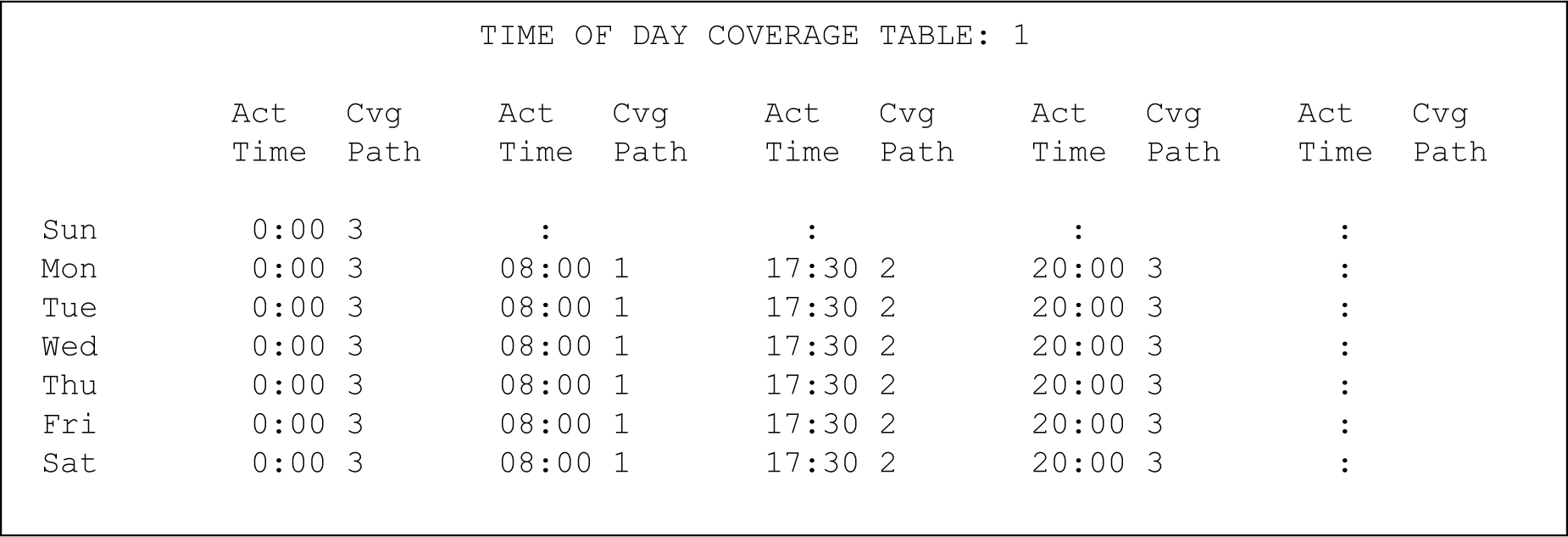
Enter the time in a 24-hour format, from the earliest to the latest. For example, assume that coverage path 1 goes to the co-worker, coverage path 2 goes to the home, and coverage path 3 goes to voice mail. In this example, the user has the following coverage:
During the work day from 08:00 to 05:29, the system uses coverage path 1 to route calls to a co-worker.
In the evening from 05:30 to 19:59, the system uses coverage path 2 to route calls to home.
At night from 20:00 to 7:59 the following morning, the system uses coverage path 3 to route calls to voice mail.
Define the path for the time period from 00:01 to 23:59 that you want coverage to operate. If you do not assign a coverage path to a specific time interval, no coverage exists from that time until the next coverage path activation time.