

AVAYA DOCUMENTATION CENTER
Find answers to your technical questions and learn how to use our products
Deploying Avaya Oceana®
Recovery from failure scenarios
The following table lists the recovery mechanism for different failure types:
Failure type |
Recovery mechanism |
Notes |
|---|---|---|
Process Failure For example GigaSpaces PU failure, WebSphere process failure, and Nginx process failure |
Automatic |
- |
Virtual Machine Failure For example accidental shutdown |
Manual |
If an Avaya Breeze® platform node in an Avaya Oceana® cluster becomes faulty or is shut down for testing, you must reboot all nodes in the cluster after the recovery of the node. The reboot is mandatory to:
Rebooting all nodes in the cluster causes an outage of Avaya Oceana®. Therefore, you must plan the reboot during a maintenance window. |
Physical Server Failure For example power failure on a physical server. |
Automatic |
After you clear the fault and restart the physical server and virtual machines. |
Network Failure For example accidental disconnection of all network cards of a physical server. |
Manual |
Recommission the physical server or the virtual machine.
Note:
|
With the Avaya Oceana® Release 3.8, you do not need to restart all the Avaya Oceana® clusters if you have to restart an individual cluster. If you want to restart Unified Agent Controller (UAC) cluster, the agents must not have any contacts. If the agents are having contacts and you restart UAC cluster, then you must restart all the clusters in the following order:
Core cluster
UAC cluster
OCP cluster
In Avaya Oceana®, you must deploy virtual machines within a network configuration that does not have a single point of failure.
The following diagram depicts a network configuration of two physical servers hosting virtual machines:
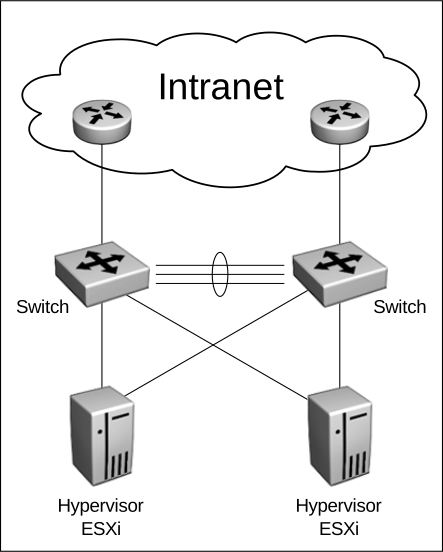
In this configuration:
Each physical server is configured with two Network Interface Cards (NICs).
Each NIC on each physical server is connected to a separate switch.
Each switch is connected to the company’s intranet through separate routers or switches.
In this configuration, a single failure of a cable, NIC, switch, or router does not impact the network connectivity of virtual machines.