

AVAYA DOCUMENTATION CENTER
Find answers to your technical questions and learn how to use our products
Administering Avaya Call Management System
Modifying a VDN call profile using the PC Client
- From the Controller window, navigate to .
STEP RESULT:CMS Supervisor displays the Call Center Administration window.
- In the ACD field, select the ACD on which the VDN call profile will be modified.
- In the Operations list, select VDN Call Profile Setup.
- Click OK.
STEP RESULT:CMS Supervisor displays the VDN Call Profile Setup window.
- In the VDNs field, enter the name or number of the VDN for which the associated call profile is to be modified.
- Select from the menu bar.
ADDITIONAL INFORMATION:Supervisor populates the remaining fields on the VDN Call Profile Setup window with the call profile settings for this VDN. If no call profile has been created for this VDN, the Service Level Increments (seconds) values are set to 0.
- In the Acceptable service level field, enter the speed of answer objective for the profile.
ADDITIONAL INFORMATION:Acceptable service level represents the maximum number of seconds it should take for a call to be answered. Valid values are 0 to 9999. This value should be no larger than the number of seconds in the intrahour interval that is set on CMS. For example, 1800 for a 30-minute intrahour interval or 3600 for a 60-minute intrahour interval. You must enter a value in this field.
- In the Service Level Increments (seconds) fields, enter a progressively greater number of seconds in each To field. Each field can support values from 0 to 999.
ADDITIONAL INFORMATION:If the unanswered call surpasses the time limit for an increment, it moves on to the next increment. For example, 0 to 5 to 10 to 25 represents 0 to 5 seconds, 6 to 10 seconds, and 11 to 25 seconds.Each of the nine increments can vary in length. For example, 0 to 15, 16 to 20, 21 to 26, 27 to 38, 39 to 43, and so forth.The following example displays how an administrator might set up a call profile:
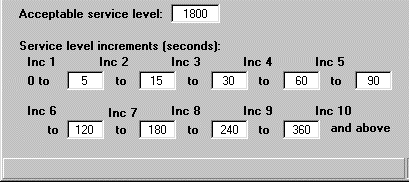 In this example, the Acceptable service level field is set to 1800 seconds to correspond with the intrahour interval on the CMS server.Inc 1 has been set for the range of 0 to 5 seconds. Inc 2 ranges covers 5 to 15 seconds. The other service level increments continue on until Inc 10. This last service level increment is used in this example is for those calls that extend beyond 360 seconds. If a call is not answered after the acceptable service level of 1800 seconds, the call is then tracked in a different CMS database category.
 - Select from the menu bar.
ADDITIONAL INFORMATION:The status bar displays a Successful message when the operation completes.