

AVAYA DOCUMENTATION CENTER
Find answers to your technical questions and learn how to use our products
Administering Avaya Call Management System
Copying a shortcut
This topic provides the procedure for copying an existing shortcut into a new shortcut. All users can copy shortcuts owned by other users. However, no shortcuts owned by your user ID, even as an Administrator, can be copied by you to another user. It is not possible to copy a shortcut over an existing shortcut.
- From the CMS main menu, press F4 (Keep).
- Select Shortcut and press the Enter key.
STEP RESULT:CMS displays the Shortcut window.
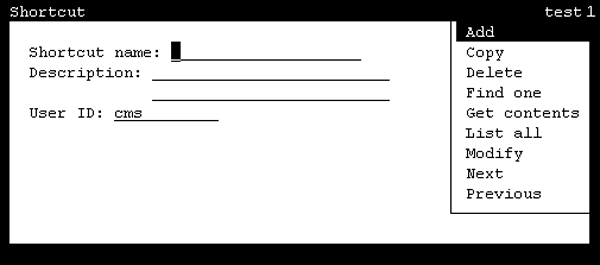
- In the Shortcut name field, enter the name of the new shortcut that will be created.
- In the Description field, enter a brief phrase identifying the new shortcut.
ADDITIONAL INFORMATION:This field is optional.
- In the User ID field, ensure your user ID is present.
- Press the Enter key.
STEP RESULT:CMS shifts focus to the action list.
- Highlight Copy and press the Enter key.
STEP RESULT:CMS displays the Shortcut: Copy window.

- In the Copy from field, enter the name of the shortcut to copy as the new shortcut.
- In the User ID field, enter the ID of the user that owns the shortcut to copy.
- Press the Enter key.
STEP RESULT:CMS shifts focus to the action list.
- Press the Enter key again.
STEP RESULT:CMS creates the new shortcut, closes the Shortcut: Copy window, and displays a Successful message in the status line.
- Select the Exit SLK to close the Shortcut window.