

AVAYA DOCUMENTATION CENTER
Find answers to your technical questions and learn how to use our products
Administering Avaya Call Management System
Deleting shortcut tasks
This topic provides the procedure for deleting a task from a shortcut.
- From the CMS main menu, press F4 (Keep).
- Select Shortcut and press the Enter key.
STEP RESULT:CMS displays the Shortcut window.
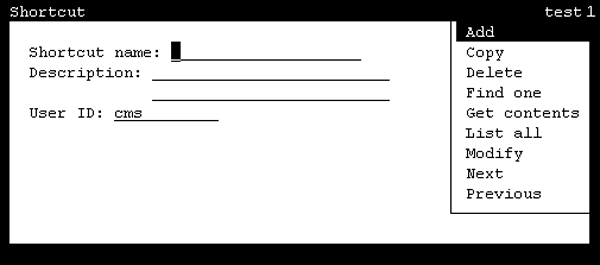
- In the Shortcut name field, enter the name of the shortcut containing the task to delete.
- Press the Enter key.
STEP RESULT:CMS shifts focus to the action list.
- Highlight Get contents and press the Enter key.
STEP RESULT:CMS displays the Shortcut: Get Contents window.
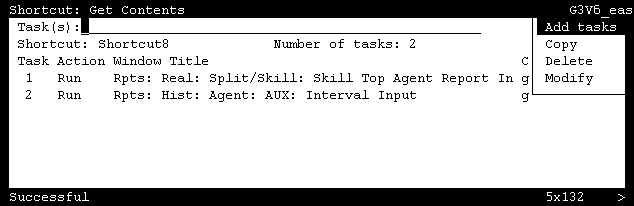
- In the Task(s) field, enter the number of the task to delete.
- Press the Enter key.
STEP RESULT:CMS shifts focus to the action list.
- Highlight Delete and press the Enter key.
STEP RESULT:CMS displays a confirmation window asking if the changes to the shortcut should be saved.
- Press the Y key and then the Enter key.
STEP RESULT:CMS deletes the specified tasks and displays the Shortcut: Get Contents window.
- Select the Exit SLK to close the Shortcut: Get Contents window.