

AVAYA DOCUMENTATION CENTER
Find answers to your technical questions and learn how to use our products
Administering Avaya Call Management System
Listing all timetables
This topic provides the procedure for listing all timetables that currently exist in the CMS database. Listing all timetables can assist in finding specific timetables when you cannot remember the entire name of a timetable. It is also useful in helping to determine if too many timetables are scheduled to run at the same time.
- From the CMS main menu, press F4 (Keep).
- On the Keep SLK menu, select Keep Timetable.
STEP RESULT:CMS displays the Timetable window.
- Press Ctrl+Z.
STEP RESULT:CMS clears the default information from all fields in the Timetable window.
- Press the Enter key.
STEP RESULT:CMS shifts focus to the action list.
- Using the arrow keys, move the cursor to the List all menu item and press the Enter key.
STEP RESULT:CMS displays the Timetable: List All window listing all timetables.
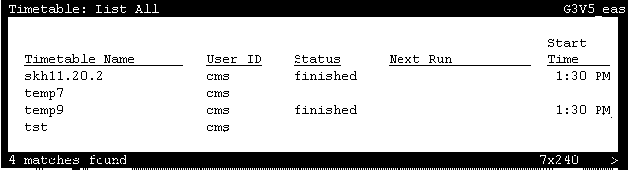 Use the right- and left-arrow keys to scroll to the other fields in this window.The following list describes the entries that can appear in the Status field.
-
Finished: This message indicates that the timetable was scheduled to run once and it completed successfully.
-
Failed: This message indicates that the timetable failed to run successfully for the last scheduled run time.
-
Successful: This message indicates that the timetable completed successfully.
-
Unscheduled: This message indicates that the timetable does not have a start time or start date.
-
Running: This message indicates that the timetable is currently running.
-